
What is Instagram’s “Mute” feature and why should you use it
Instagram launched the Mute feature in 2018 with a clear mission: to let users filter what they see in their feed without cutting their digital ties with other profiles. It is a discreet and, above all, reversible option. Nobody gets notified: your privacy is fully respected. Muting a profile means you keep following someone, but you stop seeing their posts, their stories, or both. It is perfect in plenty of situations: colleagues who post far too often, relatives whose tastes are nothing like yours, or simply when you want to turn down the “noise” without creating any awkwardness.How to mute an Instagram account in 3 simple steps
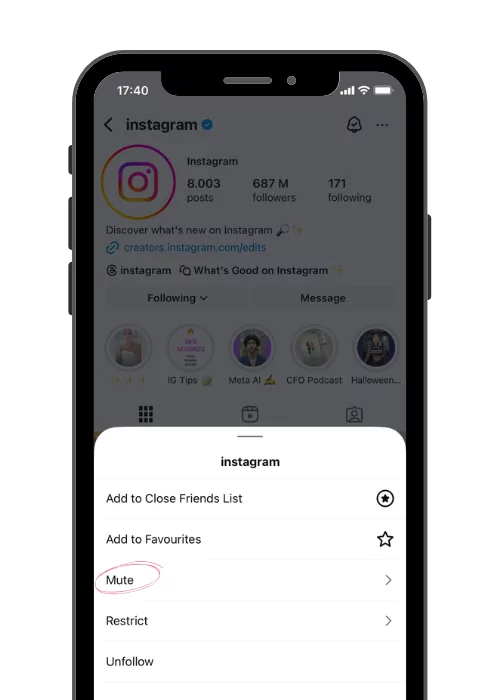
Instagram lets you mute a profile in two ways, both easy but suited to different moments. With the first method, all you need to do is:- Go to the profile of the person you want to mute;
- Tap the “Following” button;
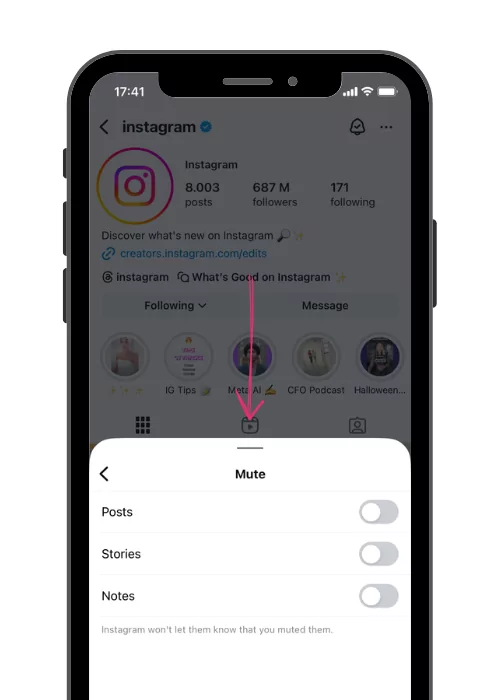
- Select “Mute” and choose what to hide: posts, stories or both.
- Press and hold the story;
- Wait for the drop-down menu and tap “Mute”;
- Choose whether to hide posts, stories or both.
How to unmute a profile
Changing your mind is as easy as muting! Just go back to the person’s profile, tap “Following” and then “Mute”, unchecking whatever you had hidden. If instead you want to see every profile you have muted, go to: Settings > Privacy > Muted accounts.What if you are the one being muted?
Having worked on Instagram for many years, we know that every piece of content you publish can be an opportunity, or a test. Followers can mute you if you do not offer value, if you are too present or too absent! Here are a few tips worth keeping in mind so people do not mute you. Before you post, ask yourself:- Is my content useful, consistent with my style, and visually well cared for?
- Frequency matters too: am I posting too much or too little? Too many stories or posts a day can be overwhelming, while disappearing for weeks can make people forget your profile. Balance is everything.
- Am I interacting with my followers in a genuine way? Use questions in your captions, reply to DMs, experiment with polls in stories. A follower who feels involved will rarely mute you.
- Am I using hashtags sensibly?
Conclusion: a mindful approach to your own feed
Muting a profile is a way to filter your interests and move away from users and content that no longer represent you. If you want to keep your profile out of other people’s muted lists, find out how to improve your engagement on Instagram. And what if, from today, you learned to use this feature not just to tidy up your feed, but to really understand what you want to see? Instagram is not only a shop window: it is an environment. And like any space, it deserves care and curation! Managing it mindfully is the best way to shape your online experience and focus on what genuinely inspires and interests you, so you can grow. If you want to take your profile to the next level and build a real community, explore our organic growth programs. Or, if you are not sure where to start, request a free analysis of your profile! We are on WhatsApp too, if you need to talk to our team and pin down your goals!When muting beats unfollowing
Pew Research data (2024) shows that 40% of social media users have unfollowed someone because of too much content, but muting is often the better call because it keeps the social relationship intact without the awkwardness of a visible unfollow.
Muting is especially handy in these situations:
- Professional contacts: colleagues or clients who post a lot but with whom you need to keep a relationship
- Friends and family: people you care about whose content does not interest you but who would notice if you unfollowed them
- Temporarily noisy accounts: normally useful profiles going through an over-posting phase
The mute feature is completely private: nobody is notified when you mute their profile, their Stories or their posts.
How muting improves your algorithm
Strategically muting accounts that are irrelevant to your feed has an indirect effect on the Instagram algorithm. When you remove the “noise” and only interact with content relevant to your niche, the algorithm learns to show you posts that are more in line with your real interests.
This creates a virtuous circle: a cleaner feed leads you to interact with quality content, the algorithm registers those positive interactions and serves you even more relevant content. For creators and professionals, a curated feed is also a source of inspiration and a competitive benchmark.
Frequently Asked Questions About Muting on Instagram
Can the muted person find out they have been muted?
No, Instagram does not send any notification when you mute a profile. The only way to suspect it would be to notice a drop in your interactions, but there is no feature that shows who has muted you. Privacy is total and the feature was designed specifically for that.
Can I mute only Stories without muting posts?
Yes, Instagram gives you granular control: you can mute posts, Stories and notes separately. Press and hold the person’s Story, select “Mute” and choose whether to mute only Stories, only posts or both. Each option works independently of the others.
Is there a limit to how many profiles I can mute?
There is no official limit to the number of accounts you can mute. You can mute as many profiles as you like with no restriction. To review your muted accounts, go to Settings → Privacy → Hidden words → Muted accounts, where you will find the full list with the option to restore them.
Related resources
- The best Instagram growth services
- Close friends list on Instagram
- Link in Bio: everything you need to know
Instagram Guides by Industry
Frequently asked questions about muting Instagram profiles
If I mute an Instagram profile, does the person find out?
No. Instagram does not send any notification when you mute a profile. The person sees nothing and receives no alert. They will still appear in your following list and can message you as usual: only their posts and/or their Stories stop showing up in your feed.
What happens when you mute an Instagram profile?
The muted profile stays among the accounts you follow, but its content no longer shows up in your feed (posts, Stories or both, depending on what you chose). You can still visit the profile and see everything manually. Likes and DMs work exactly as before: it is a feature the other side cannot see.
How do you mute an Instagram profile in 3 taps?
Open the person’s profile, tap the "Following" button, select "Mute". From there choose whether to mute only posts, only Stories or both. The change is immediate and reversible at any time from the same menu.
How do you start seeing the posts of a muted profile again?
Go to the person’s profile, tap "Following" and then "Mute". Turn off the active option (posts, Stories or both). The content will be back in your feed from the next refresh. Here too, no notification is sent.
Does the muted person still see my content?
Yes, completely. Muting is a one-way action: it only affects what you see. The person will keep seeing your posts and your Stories, and can interact with your content just as before.
See what changes in 11 days
The full service on your profile, without subscribing. If it convinces you, move to a plan. If not, it ends there.
- 11 days of full service
- One single payment, no renewal
- Once per customer
29 €
Start now


