
What is the Link in bio on Instagram?
The Link in bio on Instagram refers to the clickable link you can add to your bio section, a strategic space to attract and engage your audience. This section allows you to share information about yourself or your business, include calls to action (CTAs), hashtags, and anything else that can turn visitors into followers.
Since Instagram doesn’t allow clickable links in posts, this is one of the only ways to share an external link, whether it’s your website, a landing page, or other valuable resources for your followers!
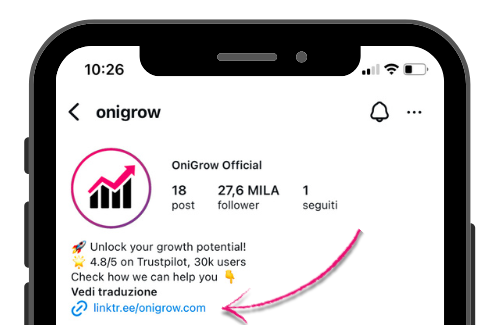
Where exactly can you find it?
Its role in marketing
The Link in Bio drives 75% of the referral traffic that goes from Instagram to external sites according to Linktree (2025), with an average CTR of 3.2% for optimized profiles, which makes it the most effective tool for turning followers into site visitors, newsletter subscribers or paying customers.
The Link in Bio is your ultimate ally in marketing strategies. With this tool, you can centralize all the products or services you offer into a single link, making content management and online communication much more efficient.
If you’re an entrepreneur, you’re likely using social media to connect with your audience and attract potential customers. But what if you had a fast and effective tool to direct your followers to the most relevant content and latest updates without losing their attention? The Link in Bio is exactly what you need. It serves as a central hub where you can gather all your essential resources.
You can include different types of links in your feed, such as:
- Website link
- Links to other social platforms
- Affiliate links (e.g., Amazon)
- Newsletter signup link
- Online shop
This makes purchasing easier and helps people quickly find the content they’re looking for, discover more about your brand, and enjoy a smoother user experience.
Even if you don’t run a business, you can still use the Link in Bio as a powerful strategy. It’s a simple and direct way to share your world, guiding followers to your creations and valuable resources, increasing your visibility, and making you more accessible. Pairing a strong Link in Bio with organic Instagram growth is one of the most effective ways to drive real traffic.
How to add the Link in Bio
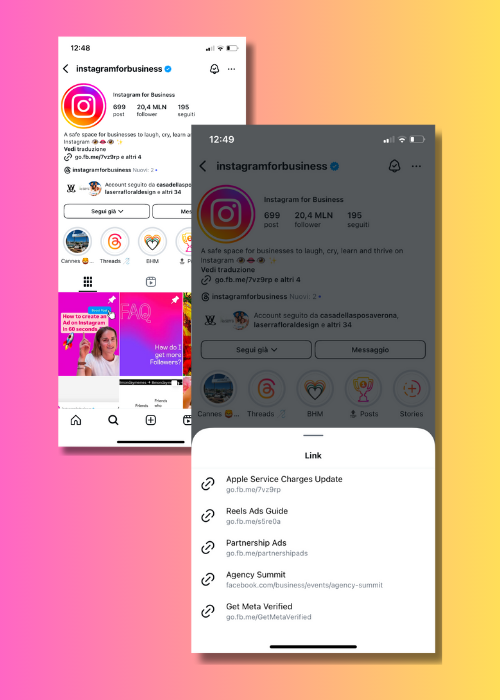
There are two options for adding multiple links to your Bio: you can either do it directly from Instagram account settings or create a landing page using an external website.
Applications to customize your Link in Bio
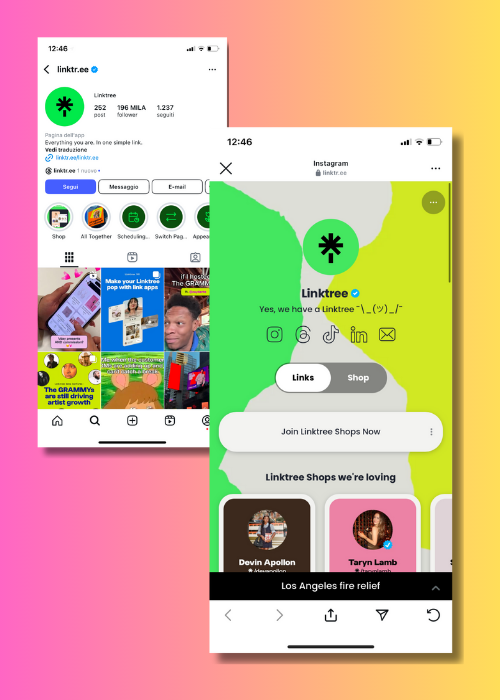
If you choose the second option, creating a landing page, we recommend using these tools to make it more attractive and functional! Here are some of the best applications:
Linktree
One of the most well-known platforms, the free version comes with great features and is easy to use and customize. It also offers a premium version with advanced functionalities.
Lnk.Bio
A great platform for managing links efficiently, featuring a minimalist interface and solid options in the free plan. Paid plans allow for full customization, including brand colors and even scheduling link updates.
Feedlink
Useful for creating a more interactive experience, with the ability to integrate social media content, such as posts and videos, directly into the landing page. It also provides analytics to track link performance.
Canva
More than just a design tool, Canva allows you to create Link in Bio pages with eye-catching, customizable templates that are easy to integrate with your links.
Milkshake
Enables you to create a mini website with a clean, professional design, and it’s simple to use.
In conclusion
Use the Link in Bio to drive traffic to relevant and strategic content for your audience, and make the most of our tips:
Choosing the right links
If you add multiple links, carefully select the first one, as it will be the only one visible on your profile. This will be the link that grabs your audience’s attention.
Regularly update your links
Make sure to update your links to reflect the latest offers, products, and content. Whenever you change your Link in Bio, remember to also update the captions of previous posts where you invited followers to click the link, to avoid confusion.
Test your links
Always test your links on both mobile and desktop to ensure they work correctly. If you notice any issues, check for common errors (such as an outdated app or incorrect URL), as a broken link can negatively impact your followers’ experience.
Enable tracking
To better understand your audience’s behavior, activate analytics and tracking tools. Monitoring the performance of your links will help you refine your strategy and improve your results. To maximize the traffic reaching your Link in Bio, explore the best Instagram growth services available today.
[dt_divider style=”thin” /]
To boost traffic to your Instagram profile and direct more visitors to your website using your featured Link in Bio, get in touch with us! We specialize in this and can help you grow.
Click here to check out our organic growth plans and contact us on WhatsApp for any questions. We’re here to help!
Want to dig deeper? Read our complete guide on how to grow on Instagram in 2026 for a full strategy.
Related resources
Instagram Guides by Industry
Frequently asked questions about the Instagram link in bio
What is the link in bio on Instagram?
It is the one clickable link Instagram lets you put in your profile bio. It shows up under the description and above the story highlights. It is there to send visitors to your website, a landing page, a shop or a collection of multiple links (a link tree).
Where is the link in bio on Instagram?
The link in bio sits on your profile page, under your name and your short bio. Anyone visiting your profile can tap it directly. To change it: tap "Edit profile" → the "Website" field → paste the URL → tap "Done".
How do I add a link to my Instagram bio?
Go to your profile, tap "Edit profile", then tap the "Link" or "Website" field. Paste the full URL (including https://) and tap "Done". The link shows up in your bio straight away and anyone visiting your profile can tap it.
Can I put more than one link in my Instagram bio?
Yes, since 2023 Instagram allows up to 5 links in the bio. Alternatively you can use an external app (Linktree, Beacons, OniLink) that gathers several links into a single landing page: the URL of that landing page becomes your link in bio.
Which are the best free link in bio apps?
The most widely used are Linktree (the best known, free plan with branding), Beacons (modern templates, free up to a certain amount of traffic), Stan Store (built for creators) and Carrd (for custom landing pages). Choose based on how much you need to customize and whether you sell products directly.
See what changes in 11 days
The full service on your profile, without subscribing. If it convinces you, move to a plan. If not, it ends there.
- 11 days of full service
- One single payment, no renewal
- Once per customer
29 €
Start now


