
Hashtags are still one of the most misunderstood tools on Instagram. Some people throw in thirty at random, some have given up on them completely, some keep copying the same block from a list they found back in 2022. Yet in 2026 their role in the platform’s ecosystem has changed in a meaningful way. The Instagram algorithm uses them to classify content and put it in front of the right people, which means a well built hashtag strategy can be the difference between a post nobody sees and one that reaches thousands of new people.
In this complete guide we have put together everything you need to know: from the basic definition to the professional tools, taking in common mistakes and concrete strategies along the way. If you want to grow on Instagram in 2026, this is where you start.
TL;DR: Instagram hashtags in 2026 work as classification labels for the algorithm. The most effective strategy combines niche hashtags (10K-200K posts), branded hashtags and seasonal hashtags, placed in the post caption. Stay away from the very generic ones with millions of posts: your content disappears in seconds. Use tools like Sistrix or All Hashtag for your research.
What are Instagram Hashtags?
A hashtag is a classification label made up of the pound symbol (#) and a word or phrase with no spaces. The term comes from putting together hash (the pound sign) and tag (label). On Instagram, every hashtag lets the platform index your content and makes it findable by anyone looking for that specific topic.
Think of hashtags as the labels in a well organised pantry. With no labels, you would be staring at anonymous jars sitting next to each other. With the right labels, every item ends up on the correct shelf and gets found by whoever is looking for it. The mechanism is the same: Instagram reads your hashtags, works out what the post is about and shows it on the matching discovery pages.
How indexing works
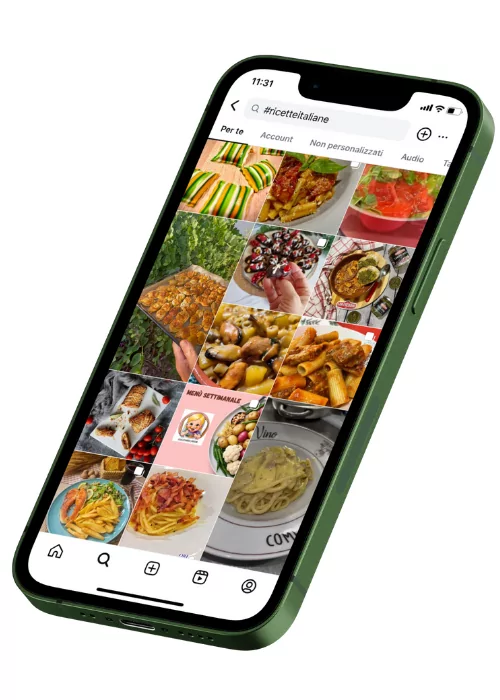
When you publish a post with the hashtag #MilanPhotography, Instagram adds it to that hashtag’s feed. Anyone who follows or searches for #MilanPhotography can see your content. This is the basic mechanism of organic discovery on the platform.
But there is more to it. The algorithm does not simply read your hashtags: it uses them alongside other signals (engagement, relevance, freshness) to decide where to place your post inside the hashtag page. A post with good engagement and relevant hashtags has a much better chance of showing up in the “Top” section rather than in the chronological feed.
Why use Hashtags in 2026?
Hashtags give you three concrete advantages: they push your posts beyond your current followers, they help the algorithm classify your content correctly and they open a direct channel to an audience that is already interested in your topic. Giving up on hashtags means giving up one of the few free distribution tools Instagram makes available.
Visibility and organic discovery
Without hashtags, your post mainly reaches people who already follow you. With targeted hashtags, you join wider conversations. Someone who follows #VeganRecipes will see your post even without knowing you – and if the content is good, you have earned a new follower without spending a penny on advertising.
This mechanism is especially powerful for growing profiles. If you have few followers, you cannot rely on the organic reach of your own audience. Hashtags bridge that gap, giving your content a chance to be seen regardless of the size of the account. If you want to look at every option available to speed up growth, read our comparison of the best Instagram growth services.
Helping the algorithm
The Instagram algorithm needs to understand what your profile is about. Hashtags are one of the most direct signals you can hand it. If you consistently use fitness related hashtags, Instagram starts showing you to people interested in fitness – not only through the hashtags themselves, but also in the Explore section and in the “Suggested accounts” recommendations.
There is a cumulative effect here. The more your hashtags match your content, the more precise the algorithm becomes at classifying you. Switching topic every week and using random hashtags confuses the system and cuts your reach. If you want to dig into how this works, read our guide on how to improve engagement on Instagram.
Shares and virality
A well placed hashtag can set off a chain of shares. When your post appears on the “Top” page of a popular hashtag, it gets seen by thousands of people who do not know you. If the content lands, it gets saved, shared to stories, sent by DM – and all of that pushes the post’s visibility even further in a virtuous cycle.
How do you choose the right Hashtags for your profile?
Choosing your hashtags is the step that separates an effective strategy from one that wastes its potential. The basic principle is simple: pick hashtags with a post volume between 10,000 and 200,000. In that range, your content has a realistic chance of surfacing without being buried by the competition of the big numbers.
The three categories to combine
A solid hashtag strategy rests on three types of hashtag used together:
- Niche hashtags: specific to your sector and your audience. Their volumes are contained (10K-200K posts) but the audience is targeted. Example: #NaturalSkinCare instead of #Beauty.
- Branded hashtags: created by you for your brand or your community. They gather all your content under one recognisable umbrella. Example: #YourBrandName.
- Trending and seasonal hashtags: tied to events, holidays or whatever is trending. They have a short life but they can produce spikes in visibility. Example: #Christmas2026, #FashionWeek.
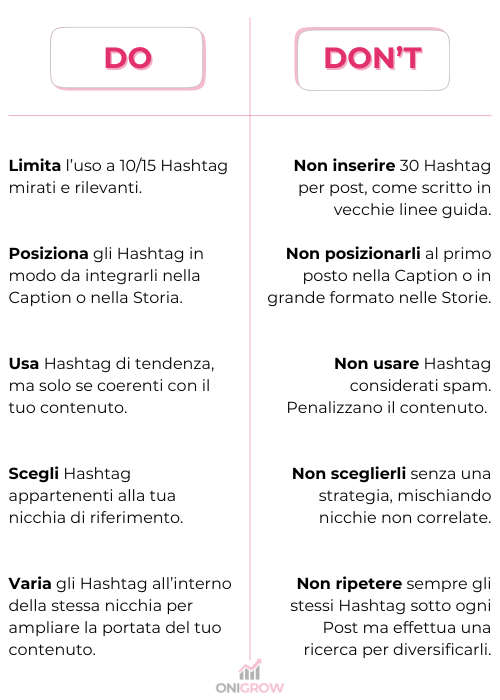
The ideal mix for each post? A handful of niche hashtags, one or two branded, and one or two seasonal if they fit. You do not need thirty. Between 5 and 15 well chosen hashtags work better than thirty generic ones.
How to analyse hashtag volume
Before you use a hashtag, search for it on Instagram and look at how many posts it has. If it has millions – like #Love or #InstaGood – your post will vanish within seconds. If it has fewer than 1,000, chances are nobody is searching for it. The 10K to 200K band is the sweet spot for most profiles.
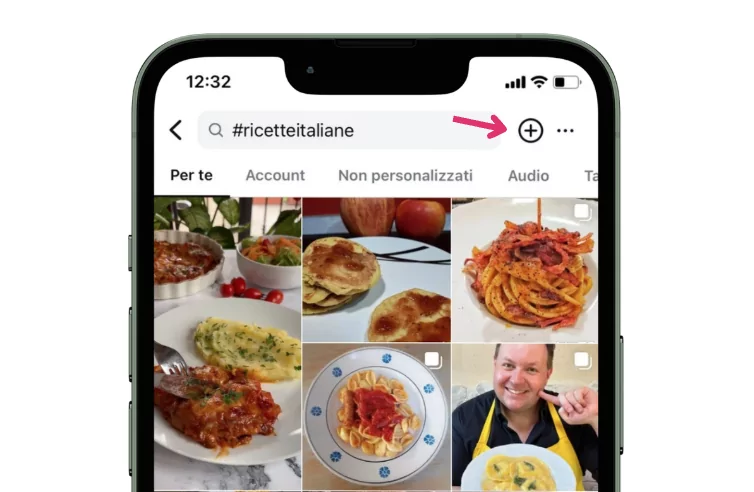
A practical trick: go to the Explore section of Instagram and type a keyword from your sector. The platform will suggest related hashtags with their post count. Note down the ones in the right range and build themed groups you can rotate across your content.
Build ready to use lists
Preparing hashtag groups in advance saves you time and keeps you consistent. Create 4-5 different themed sets, each with 10-15 hashtags, and alternate them between posts. Save them in your phone notes or in a spreadsheet. Avoid pasting the same block every time: Instagram can penalise repetitive behaviour.
Want your hashtags to work in sync with the rest of your profile? Make sure your Instagram bio is optimised for the same audience you are trying to reach.
Where to put your Hashtags: caption or comments?
The most frequent question about hashtags is where they go: caption or first comment? Both options work for indexing – Instagram confirms that hashtags in the comments are read in exactly the same way. The choice depends on the type of content and on how much you care about the look of your caption.
Hashtags in the caption
Putting the hashtags at the end of the caption is the most direct method. The advantages:
- They get indexed immediately at publication
- They are visible to anyone scrolling the feed (even if few people actually read them)
- They do not require an extra step after publishing
To keep the caption clean, you can add a few dots or blank lines before the hashtag block. That way they appear “below the fold” and do not get in the way of the main text. Plenty of professional creators use this technique with excellent results.
Hashtags in the first comment
The alternative is to publish the hashtags as the first comment right after the post. This works well if:
- You want a completely clean caption focused on the message
- Your communication style is minimal
- You publish long captions and do not want to weigh them down further
The only downside is the delay. If you do not comment straight after publishing, you lose the first seconds of indexing. In practice, though, if you do it within a minute the difference is negligible. What matters is that the hashtags are relevant – not where you put them.
Do viral Hashtags really work?
The short answer: it depends on what you mean by “work”. A viral hashtag like #Viral or #FYP can bring views, but it rarely brings real followers or meaningful engagement. The reason is simple: the audience browsing those hashtags is generic, not interested in your specific topic. Engagement counts for more than raw reach.
The myth of the magic hashtag
There is no hashtag that makes mediocre content go viral. Virality depends on the quality of the post, on the immediate reaction of the audience and on how relevant it is for them. Hashtags amplify content that already works – they do not rescue weak content. Anyone promising “secret hashtags to go viral” is selling you an illusion.
We have seen profiles use nothing but hashtags with millions of posts and pick up a few dozen interactions. And small profiles with targeted hashtags reach thousands of new people. The difference was not in the hashtags, but in the combination of relevant content and hashtags that suited that niche.
How to balance niche and popularity
The strategy that works best in 2026 is a calibrated mix:
- 70% niche hashtags – specific, with 10K-200K volume, tied to your sector
- 20% mid sized hashtags – broader but still relevant, with 200K-500K volume
- 10% popular or trending hashtags – to ride a wave, but without expecting miracles
This proportion gives you stability with the niche ones, room to grow with the mid sized ones and the occasional boost from the popular ones. But remember: engagement on your posts is the strongest signal for the algorithm. The right hashtags + content that generates interactions = real growth. Instagram Reels also benefit enormously from a well built hashtag strategy.
Seasonal and event related hashtags
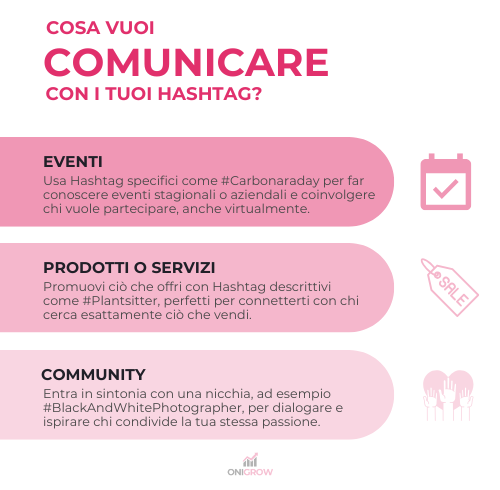
The most useful trending hashtags are the ones tied to specific events, holidays and the social topics of the moment. #Sanremo2026, #BlackFriday, #EarthDay – these peak in searches over a precise period and then drop off. Use them when your content really is connected to the event. Forcing a trending hashtag onto an unrelated post backfires: the algorithm notices and cuts your reach.
What are the best tools for finding Hashtags?
Searching for hashtags by hand on Instagram works, but it gets slow once you manage several profiles or publish frequently. There are dedicated tools that analyse volumes, suggest combinations and speed up the selection process. Here are the most reliable ones available in 2026, split between free and advanced.
Free tools
- All Hashtag (all-hashtag.com): enter a keyword and it generates lists of related hashtags, sorted by popularity. It also has a hashtag counter and a random generator for inspiration.
- Display Purposes (displaypurposes.com): suggests relevant hashtags while filtering out spammy or banned ones. Minimal, fast interface. Handy if you want clean results without too many filters to configure.
- RiteTag (ritetag.com): analyses your hashtags in real time and grades them with a colour system – green for the ones that can bring immediate visibility, blue for those with gradual growth.
Advanced tools
- SISTRIX (sistrix.com): a complete SEO platform that includes a module dedicated to Instagram hashtags. It shows volume, trend and related hashtags. The basic version offers a limited number of free searches.
- Leetags: a mobile app that generates hashtags starting from a photo or a keyword. Convenient if you publish straight from your phone and want quick suggestions on the spot.
Practical advice? Use a free tool for daily research and an advanced one for the monthly review of your strategy. You do not need all of them – pick two and learn to use them well.
What Hashtag mistakes should you avoid?
Plenty of profiles sabotage their own growth with hashtag mistakes that are easy to avoid. From picking hashtags that are far too generic to using the same set on every post, these slips cut your reach and can even attract penalties from the algorithm. Let us look at the most frequent ones and how to fix them.
Hashtags that are too generic
Using #Love, #InstaGood or #PhotoOfTheDay is like shouting in a packed stadium. Millions of posts compete for the same visibility and your content is buried within seconds. Always pick hashtags that are specific to your sector, where you have a concrete chance of surfacing in the results.
Copying the same set every time
Instagram notices when you use the exact same block of hashtags on every post. That behaviour can reduce your reach because the system reads it as spam or automation. Prepare at least 4-5 different groups and rotate them between posts, adapting them to the specific content of each one.
Using irrelevant hashtags
If you sell shoes and you use #EasyRecipes because it has a lot of volume, you are not reaching your audience. You are reaching people looking for recipes. Even if you pick up a few extra views, those people will not interact with your content and that damages the overall engagement rate of the profile.
Banned or suspicious hashtags
Instagram periodically bans hashtags associated with spam or inappropriate content. Using a banned hashtag can reduce the visibility of the entire post, not just of that hashtag. Always check with tools like Display Purposes, which automatically filters out the problematic ones before suggesting alternatives.
Never updating your strategy
The hashtags that worked six months ago might not work today. Volumes change, new hashtags appear, others get saturated. Review your groups at least once a month. Check the performance in your Instagram Insights and replace the ones that are not delivering. To understand how to read that data, take a look at our guide to Instagram engagement.
Frequently Asked Questions (FAQ)
How many hashtags should I use per post?
Instagram allows up to 30 hashtags per post, but using all of them is not necessarily an advantage. Most creators get the best results with 5-15 well selected hashtags that are relevant to the content. Quality counts for far more than quantity: 8 targeted hashtags beat 30 generic ones copied from a list found online.
Do hashtags work in Stories and Reels too?
Yes. In Stories you can add up to 10 hashtags (you can even hide them by shrinking them or covering them with a sticker). In Reels they work exactly as they do in feed posts, and they are particularly effective because Reels already get wider organic distribution than photos.
How often should I change my hashtags?
Do not use the same identical set for more than one week in a row. Rotate between 4-5 groups prepared in advance and refresh the full list at least once a month. Check your profile Insights to see which hashtags actually bring views and interactions, then replace the ones that are not performing.
Can I use hashtags in Italian and English in the same post?
Yes, and in many cases it is a good strategy. Italian hashtags reach a more targeted local audience, while English ones widen your international reach. Just make sure both languages are relevant to the content. If your post is in Italian and aimed at an Italian audience, give priority to hashtags in that same language.
From knowing to doing: the next step
Hashtags are only one of the many pieces of an Instagram growth strategy that works. You also need quality content, an optimised bio, consistent engagement and the ability to adapt as the platform changes.
If you want to speed up the growth of your profile with professional support, OniGrow offers organic Instagram growth services built for people who want concrete results without shortcuts. No fake followers – only real growth based on strategies that work.
Read more: how to get the blue tick on Instagram
Read more: the best apps for Instagram
Read more: Instagram shadowban: causes and solutions
Read more: what your Instagram profile picture says about you
Read more: how to use donations on Instagram
Read more: Instagram Edits: the new video editing app
Instagram Guides by Industry
See what changes in 11 days
The full service on your profile, without subscribing. If it convinces you, move to a plan. If not, it ends there.
- 11 days of full service
- One single payment, no renewal
- Once per customer
29 €
Start now


