
After choosing whether to use a Business or Creator account, the real step forward on Instagram comes when you start reading and understanding your data.
Posting content without analyzing performance means relying on intuition alone. Today, growing on Instagram requires awareness: knowing what works, what doesn’t, and why, always in relation to your audience.
This is where the Instagram Dashboard comes into play. It’s an essential tool for analyzing results, improving content, and making smarter, more strategic decisions over time.
Want to go deeper? Read our complete guide on how to grow on Instagram in 2026 for a full strategy.
What is the Instagram Dashboard?
The Instagram Dashboard is a control panel that collects your main profile data and presents it in a clear, organized way.
Through metrics and visual charts, it allows you to track the performance of your profile, your content, and the audience engaging with it.
Instagram provides its own built-in Dashboard, called Instagram Insights, available only to Business and Creator accounts. There are also external Dashboards, which often offer deeper analysis and a more strategic, long-term overview of performance.
What is the Instagram Dashboard really used for?
The Dashboard isn’t just about “checking numbers” – it’s about turning data into actionable insights.
Its real value lies in answering practical questions, such as:
-
which content generates the most engagement
-
what type of audience responds best to your posts
-
which formats perform better
-
when to publish to increase visibility
Without a Dashboard, content is often published randomly.
With a Dashboard, every decision is data-driven and becomes part of a more solid strategy.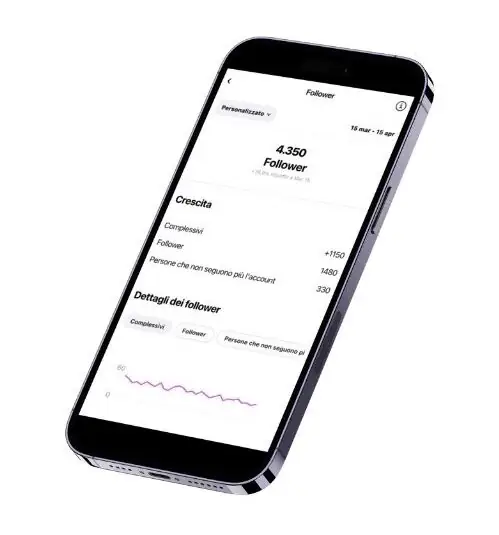
Instagram Insights: how to read it beyond the numbers
Reading the Dashboard properly is only half the job: the other half is actually growing the profile with real followers. That is exactly what we do at OniGrow: organic growth for your Instagram with gradual, monitored activity on a targeted audience.
Instagram Insights is the built-in tool that helps you start understanding your profile data.
It lets you monitor follower growth, content reach, and the performance of different formats, while also providing useful information about your audience.
The key isn’t just looking at numbers, but connecting them: comparing similar content, tracking trends over time, and understanding why one post performed better than another.
This is also where Insights shows its limits. While the data is useful, historical tracking is limited and the level of analysis remains fairly basic.
When to use an external Instagram Dashboard
External Dashboards become essential when Instagram is no longer just a social platform, but a work or business tool.
They allow you to compare different time periods, analyze engagement in depth, identify recurring trends, and gain a clearer overview of overall performance.
These tools are especially useful for creators, freelancers, brands, and social media managers who need to make strategic decisions – not just monitor daily activity. If the data shows that organic growth is not enough on its own, take a look at the best Instagram growth services to speed up your results. That’s why having a strategic marketing plan is essential to guide decisions over time.
Why the Instagram Dashboard makes a difference today
Instagram is more competitive and content-saturated than ever.
Growth doesn’t come from posting more, but from posting better – by testing, analyzing, and optimizing consistently.
An Instagram Dashboard helps you understand what works, avoid repeating the same mistakes, and improve results in a structured, conscious way.
Reading data is the first step, but turning it into an effective growth strategy takes experience and method.
If you want to grow your profile organically and strategically, you can explore our Instagram growth packages or contact us on WhatsApp for personalized information.
How to use the Dashboard for data-driven decisions
According to Hootsuite (2025), profiles that regularly analyze their Dashboard metrics grow 37% faster than those that publish without looking at the data – which makes the Dashboard an essential tool for any Instagram growth strategy.
To get the most out of the Dashboard, follow this weekly approach:
- Every Monday: check the summary of the previous week to spot the best performing content
- With every post: monitor the first 2 hours of each post to assess the initial response from your audience
- Every month: compare the metrics with the previous month to identify growth or decline trends in engagement
Focus on reach, saves and shares rather than likes alone: these deeper metrics are a better reflection of the real value your content has for your target audience.
Frequently Asked Questions
How do you access the Instagram Dashboard?
The professional Dashboard is available only to Business and Creator profiles. To open it, go to your profile and tap the “Professional dashboard” button under the bio. If you don’t see it, switch to a professional account in the settings. The dashboard shows the main metrics such as reach, interactions, follower growth and content performance.
Which metrics should you monitor in the Instagram Dashboard?
The most important metrics are: reach (how many unique people see your content), engagement rate (interactions divided by reach), saves (the strongest signal of perceived value) and net follower growth. Don’t fixate on likes, which are a surface metric. Check the dashboard at least once a week to spot trends and refine your strategy.
Instagram Guides by Industry
Frequently asked questions about the Instagram Dashboard
What is the Instagram professional Dashboard?
It is the statistics panel available to business and creator accounts. It shows data on reach, impressions, interactions, followers gained and audience demographics. It is Instagram’s main tool for understanding how your content performs and refining your strategy.
Where is the Instagram Dashboard?
Open the app, go to your profile, tap the menu (≡) at the top right and select "Professional dashboard". It only appears if you have a business or creator account: personal accounts do not see it. It is not available on the web, only on mobile.
How do you activate the Instagram professional Dashboard?
Go to "Edit profile" → "Switch to professional account" → choose "Creator" or "Business" → select the category. The Dashboard appears immediately in the profile menu. The switch is free and reversible at any time.
Which metrics can I see in the Instagram Dashboard?
The main ones are: accounts reached, accounts engaged, total followers, followers gained and lost in recent weeks, reach by Story, Reel and Post, demographics (age, gender, city) and the hours when your audience is most active. All of these metrics can be filtered by period (7, 14, 30, 90 days).
Can I see who visits my profile from the Dashboard?
No. Instagram does not show the individual users who visit your profile, only aggregated data (total number of visits, accounts reached and so on). The apps that promise to show you "who visits your profile" cannot do it: Instagram does not share that information.
See what changes in 11 days
The full service on your profile, without subscribing. If it convinces you, move to a plan. If not, it ends there.
- 11 days of full service
- One single payment, no renewal
- Once per customer
29 €
Start nowAfter payment we message you on WhatsApp with a link to approve access to your profile from the Instagram app. That is where our team starts.


