
The term Instagram professional account is used more and more frequently, but not always correctly. In practice, it refers to the profiles designed for professional use on the platform, Business and Creator accounts, while the Personal account remains the option for private use.
Understanding the differences between these account types is essential if you want to make an informed choice and use Instagram in a way that truly aligns with your goals.
What does an Instagram professional account mean today?
An Instagram professional account includes advanced features that are not available on a Personal profile. These features are designed to support visibility, growth, and communication, such as access to performance data, direct contact options on the profile, and tools aimed at improving reach and engagement.
These profiles are meant for users who see Instagram not just as a social network, but as a work, communication, or promotional tool. An Instagram professional account is not necessarily tied to a company: it can also be the right choice for anyone building a personal brand or creating content on a regular basis.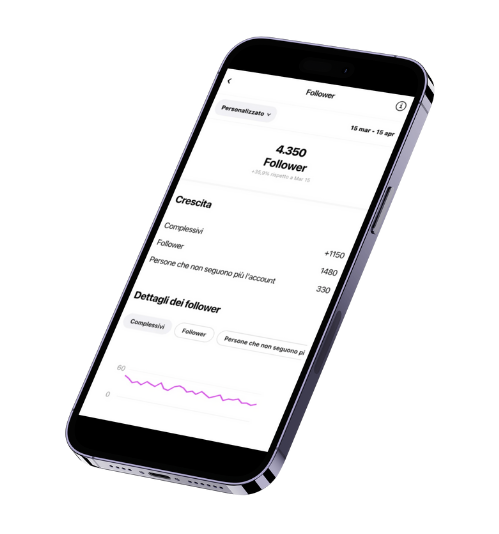
Business account: the professional profile for companies and activities
The Business account is designed for companies, shops, freelancers, and local businesses that use Instagram as a communication, marketing, or sales channel.
This type of Instagram professional account offers useful features to manage a professional presence on the platform, including:
-
Visible contact information, such as email address, phone number, or location
-
Access to Insights, to analyze audience data and content performance
-
The ability to promote posts and reels through advertising
-
A more structured way to showcase products or services
It is the most suitable option for those who want to use Instagram strategically and focus on measurable results.
Creator account: the professional profile for personal brands and creators
The Creator account is designed for people who work on their personal image, such as content creators, influencers, educators, freelancers, and communication professionals.
This Instagram professional account is less focused on direct sales and more oriented toward community growth and personal branding.
Key features include:
-
Access to Insights, with data on follower trends and content performance
-
Tools to manage and organize private messages
-
The ability to specify a category or niche, making the profile clearer and more recognizable
It is the ideal choice for those who create content consistently, collaborate with brands, and want to build authority over time without presenting themselves as a traditional business.
Personal account: when a professional account isn’t needed
The Personal account remains the simplest and most flexible option for those who use Instagram purely for private purposes. It is the only account type that can be set to private and does not include analytics or promotional tools.
How to choose the right Instagram account
Choosing the right Instagram account depends mainly on how you use the platform today and how you plan to use it in the future: in other words, on your goals.
-
If you run a business or offer services, the Business account is the most coherent choice.
-
If you are building a personal brand or working as a creator, the Creator account better suits your needs.
-
If you don’t have professional goals, the Personal account is more than enough.
Choosing an Instagram professional account doesn’t stop at selecting Business or Creator. It also means defining a strategy that aligns with your objectives. Once you’ve chosen the account type that best fits your needs, the next step is understanding how to grow it effectively and in line with your niche.
Our plans are designed to support brands and creators in organic Instagram growth, starting from clear goals and a well-defined target audience.
If you’d like to learn more, you can explore the growth plans available on our website or contact us on WhatsApp to find the solution that best fits your Instagram professional account.
Want to go deeper? Read our complete guide on how to grow on Instagram in 2026 for a full strategy.
Business vs Creator: which professional profile to choose
Instagram has offered two types of professional accounts since 2019, but according to Hootsuite data (2025), 62% of users don’t know the key differences, so they pick the wrong type and miss out on features that matter for their growth goal.
The main differences between Business and Creator accounts:
- Business: access to Instagram Shopping, contact buttons (email, phone, address), API access for third-party scheduling tools, visible business category
- Creator: more detailed Insights on daily follower growth, DM management with folders (Primary, General, Requests), Live badges and direct monetization
For brands and companies with an e-commerce or a physical store, the Business account is the better choice. For influencers, freelancers and personal brands, the Creator account offers more advanced tools for building a relationship with your audience.
How to switch to a professional account in 3 steps
The switch is free and reversible at any time. Go to Settings → Account → Switch to a professional account and select the category that best fits what you do. Instagram will ask you to connect a Facebook page (optional for Creator, recommended for Business).
After the switch you get immediate access to Insights, with historical data limited to the previous 7 days. That’s why it’s worth making the switch as soon as possible: the more data you gather, the better the strategic decisions you can base on your profile analytics.
Frequently Asked Questions about the Instagram Professional Account
Does switching to a professional account reduce post visibility?
No, it’s a myth that Instagram itself has debunked. Adam Mosseri has officially stated that the algorithm does not penalise professional accounts compared with personal ones. The perception of lower reach comes from the fact that with Insights you can finally see the real numbers, which are often lower than your initial expectations.
Can I go back to a personal account after switching to professional?
Yes, the switch is completely reversible. Go to Settings → Account → Change account type and select “Switch back to personal account”. The one downside is losing the historical Insights you have built up: once you go back to personal, all analytics data is deleted permanently.
Do you need a VAT number to have an Instagram professional account?
No, the Instagram professional account (both Business and Creator) is a free platform feature that requires no tax documentation. Any user can activate it regardless of their legal or tax status. A VAT number is only necessary if you generate revenue from your activity on Instagram, in line with Italian tax law.
Read more: how to get the blue tick on Instagram
Read more: the best apps for Instagram
Read more: Instagram shadowban: causes and solutions
Read more: how to use donations on Instagram
Instagram Guides by Industry
See what changes in 11 days
The full service on your profile, without subscribing. If it convinces you, move to a plan. If not, it ends there.
- 11 days of full service
- One single payment, no renewal
- Once per customer
29 €
Start nowAfter payment we message you on WhatsApp with a link to approve access to your profile from the Instagram app. That is where our team starts.


