
What is the Instagram Verified Badge and what is it for?
Have you ever noticed that little blue symbol next to the names of celebrities and brands on Instagram? That’s the Verified Badge, a symbol of authenticity and credibility for a profile.
While it was once reserved for celebrities and major brands, today it can also be requested by emerging creators and growing entrepreneurs, even without a large following.
But what is it really for?
In addition to distinguishing authentic profiles from impersonators, it helps protect your account from identity theft and fake profiles. To grant the badge, Instagram verifies the user’s data and official documents, ensuring that there is a real person or brand behind the account.
Having the Verified Badge means more trust from followers, greater authority, and new opportunities for growth and monetization!
What are the requirements to get the Verified Badge?
You must be at least 18 years old, live in a country where Meta Verified is available, use your real name with a recognizable profile photo, keep your account public and active, accept the terms of use, and avoid frequent changes to your username and profile picture. As mentioned, you don’t need to be a celebrity to get verified, but having visibility and engagement helps, since Instagram checks the authenticity of your profile based on articles, publications, and online mentions.
💡 Tip: ask to be mentioned in articles, interviews, or posts from authoritative sources, it will increase your chances of approval!
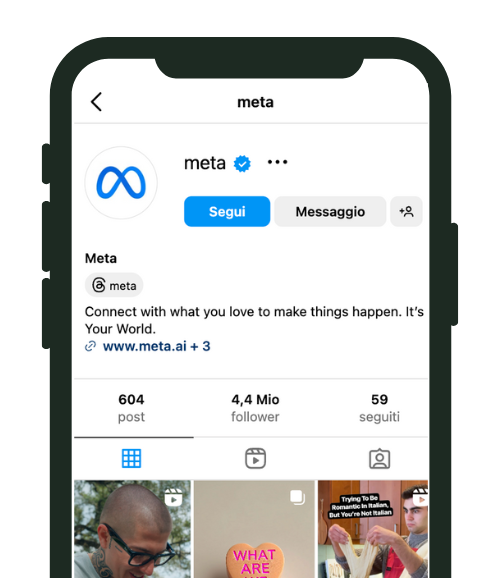
Verification can be free or purchased with Meta Verified
Free verification
Instagram grants the Verified Badge to profiles that request it and demonstrate public relevance and notability, with verifiable activity and mentions in the media. To request verification, simply go to Instagram settings, select “Request verification” and fill in the required information. If your profile does not meet the criteria, you can always consider Meta Verified to get the Verified Badge and access the extra benefits of the subscription.
Meta Verified
A monthly subscription service that guarantees the Verified Badge without the need for public notability, but after identity verification through documents and photos. Here’s the official link for more details on the requirements: Meta Verified Help.
The benefits of the Instagram Verified Badge
Getting the Verified Badge offers several advantages, both in terms of credibility and functionality! Here are the main ones:
- Authenticity and trust.
- Greater protection against identity theft.
- Increased visibility and engagement, as it boosts your exposure in search results.
- Access to exclusive tools (with Meta Verified), such as priority support and advanced features.
Questions and useful tips
You probably still have some doubts. Our advice is to keep your profile as authentic as possible and to take care of every small detail, so you can speed up the process.
A common concern is having your request rejected: if it happens, you can try again after 30 days, but only after improving your online presence. Another important point is that the Verified Badge does not automatically increase your followers: it serves to certify your identity, but growing your community will always depend on your interactions and content quality.
Conclusion
The Verified Badge can be your turning point. This badge is not just a guarantee of authenticity but a powerful tool to strengthen your reputation, protect your account, and attract a wider audience. However, the Verified Badge alone is not enough.
Want to dig deeper? Read our complete guide on how to grow on Instagram in 2026 for a full strategy.
The real difference comes from having a solid, targeted strategy to increase your visibility, authority, and community. And that’s where we come in! With the right support, you can optimize your online presence and accelerate your path toward your goals. Take a look at our organic growth packages, designed just for this. Or, if you’d like personalized advice, message us on WhatsApp and we’ll find the perfect strategy for you! ✨
How to get the verified badge in 2026
Since 2023, Instagram has offered two paths to verification: the traditional method based on public notability, and Meta Verified, the subscription service at around €13.99/month, available in Italy since 2024, which gives the blue badge to anyone who confirms their identity with an ID document.
For traditional (free) verification, Instagram looks at these criteria:
- Authenticity: the account must represent a real person or a registered business
- Uniqueness: it must be the only account representing that person or brand (exception: language-specific accounts)
- Completeness: a public profile with a bio, a profile photo and at least one active post
- Notability: the person or brand must be searched for and covered by independent sources (articles, press mentions)
Is Meta Verified really worth it?
According to the first data collected by the community (2025), accounts with Meta Verified see on average a 15-20% increase in organic reach and a higher DM response rate, thanks to the greater authority the blue badge conveys.
Still, the main advantage remains protection against impersonation: Meta Verified includes proactive monitoring of fake accounts using your name or your photos, a service that is especially useful for professionals and creators working in competitive niches.
Frequently Asked Questions about the Instagram Verified Badge
Can I lose the verified badge after getting it?
Yes, Instagram can revoke verification if you break the community guidelines, if the profile stays inactive for long periods, or if the information you provided turns out to be false. With Meta Verified, the badge is removed simply by cancelling the monthly subscription. In both cases, you can apply for verification again.
Does the verified badge really help you grow on Instagram?
The blue badge does not directly affect the algorithm that distributes content, but it has a significant indirect impact: it raises the perceived credibility of the profile, improves the visitor-to-follower conversion rate by 10-15% and reduces user scepticism when you offer paid products or services.
How much does Meta Verified cost in Italy?
Meta Verified costs €13.99/month if you buy it on mobile (iOS/Android) or €11.99/month if you buy it on the web. The service includes the blue badge, protection against impersonation, priority access to customer support and exclusive stickers for Stories and Reels. There is no minimum follower count required to subscribe.
How to prepare your profile before requesting verification
Before sending your verification request, whether free or through Meta Verified, it is essential to optimize your profile to maximise the chances of approval. Instagram weighs several factors, and a profile polished down to the details makes the difference.
Here are the steps to follow:
- Complete your bio: write a clear bio that explains who you are, what you do and why someone should follow you. Include keywords relevant to your niche and a call to action pointing to your website or link in bio.
- Post consistently: Instagram rewards active profiles. Before requesting verification, make sure you have at least 3-4 recent posts in the last two weeks, ideally Reels with high engagement.
- Look after your feed: a visually consistent feed comes across as professional. Use a steady colour palette and alternate formats (carousels, Reels, single posts) to show your range.
- Build an external presence: if you are aiming for free verification, work on your presence outside Instagram. Blog articles, podcast mentions, interviews on online outlets and listings in industry directories all increase your verifiable notability.
- Connect your accounts: make sure your Instagram profile is linked to your Facebook page and that your details are consistent across every platform.
The verified badge and the algorithm: how visibility changes
A recurring question in the community is whether the blue badge directly influences the Instagram algorithm. Meta’s official answer is no: the verification badge does not change how content ranks in the feed or in Explore.
The indirect effects, however, are significant and measurable:
- Higher follow rate: when someone finds your profile through Explore or hashtags, the blue badge makes them 15-25% more likely to hit Follow, because the badge signals reliability straight away.
- More effective DMs: messages sent from verified accounts land in the Requests folder less often and get opened more frequently, which helps networking and collaborations.
- More trust when selling: if you use Instagram to sell products or services, the blue badge reduces user scepticism and lifts the conversion rate, especially for purchases above 50 euros.
- Protection against phishing: with Meta Verified, proactive monitoring of fake accounts protects your reputation and your followers from scams and impersonation.
In short, even though the algorithm does not directly favour verified profiles, the benefits in perception and user trust translate into better metrics over time.
Common mistakes to avoid when you request verification
Many creators make mistakes that lead to their request being rejected. Here are the most frequent ones:
- Applying too early: if your profile has little content or low engagement, wait until you have built a solid base before sending the request.
- Inconsistent documents: the name on your ID must match exactly the name shown on your Instagram profile. Even small differences (abbreviations, middle names) can cause a rejection.
- Changing your username after applying: any change to the profile while it is under review can invalidate the request. Avoid changing your username, name, bio or profile photo.
- Having no external presence: for free verification, Instagram checks that you are a public figure. If there are no articles, mentions or Wikipedia pages talking about you, the request will most likely be rejected.
If your request is rejected, don’t be discouraged: you can try again after 30 days. Use that time to strengthen your online presence and fix the weak points of your profile. To dig into visibility strategies on Instagram, read our dedicated guide.
The verified badge for businesses and brands: specific requirements
If you manage a business profile on Instagram, the path to the blue badge has some particularities worth knowing. Instagram treats personal and business profiles differently when assessing verification.
For a brand or a company, the additional requirements include:
- Legal registration: the company must be registered and operating, with verifiable documentation (VAT number, company registration certificate).
- Official website: an active website linked to the Instagram profile significantly increases the chances of approval.
- Cross-platform consistency: the name and logo must be identical on every social platform where the company is present.
- Media coverage: articles in online outlets, mentions in industry directories and reviews on platforms like Google Business Profile all strengthen the brand’s verifiable notability.
With Meta Verified Business, launched as a test in 2025, companies can access exclusive features such as dedicated multi-account support, advanced phishing protection and in-depth analytics on brand perception. Pricing starts at 21.99 euros per month per account, but the gains in credibility and protection can justify the investment, especially for brands operating in competitive sectors.
Instagram Guides by Industry
See what changes in 11 days
The full service on your profile, without subscribing. If it convinces you, move to a plan. If not, it ends there.
- 11 days of full service
- One single payment, no renewal
- Once per customer
29 €
Start now


