

Instagram launches Edits, a new app designed to make video editing simpler, faster, and more accessible -right from your smartphone. Adam Mosseri, CEO of Instagram, describes it as a powerful, intuitive, and high-quality suite of tools, ideal for creating video content. Exactly what brands and creators have been waiting for!
Edits aims to become the go-to tool for creators and brands, offering everything you need to create and edit videos without jumping between multiple apps. While it’s currently in testing, the official launch is set for April 30, 2025, and it already promises to be a game-changing creative companion.
What’s new
Edits introduces some exciting features that are still hard to find on other platforms. These updates could truly make a difference -catching the attention of not only Instagram creators, but also those active on other platforms.
Here are a few highlights worth noting:
- No watermarks.
- Enhanced video quality.
- Smart content organization.
Finally, videos without watermarks -no visible logos on your content! The video quality is noticeably better, giving your work a more polished and professional look. Drafts and projects will be saved in one easily accessible section, so you can pick up right where you left off.
All these new features add serious value to Meta’s ecosystem for anyone working with digital content.
Why brands and creators will love Edits
Meta set out to create an app that’s not just useful, but also efficient, complete, and incredibly easy to use. And based on early previews -they nailed it!
Edits brings together all the tools we used to chase across multiple apps, streamlining the workflow and making content creation faster and simpler than ever. And that’s just the beginning -click here to discover even more exclusive features.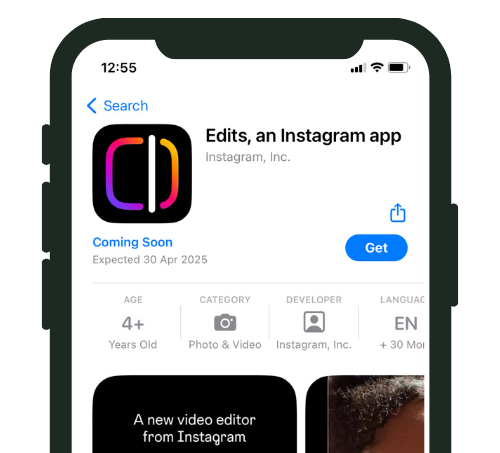
Edits: the benefits according to Meta
According to Meta, Edits will allow creators and brands to:
-
Save valuable time;
-
Access dynamic templates and professional transitions;
-
Take advantage of seamless integration with Instagram and reels, enabling direct publishing with no extra steps;
-
Collaborate as a team by sharing drafts and projects with other creators.
In conclusion
In short, Edits is set to become the new go-to for anyone working in the world of digital content. It’s more than just an editing tool -it’s a full-fledged creative platform designed for those who want to produce high-quality content and reels in just a few simple steps.
Mark your calendar: the app will be available for download starting April 30, 2025.
In the meantime, start building your community growth plan! That way, once you begin creating content with Edits, you’ll already have an engaged audience ready to connect with you.
Not sure where to start? Message us on WhatsApp and chat with our team -we’ll help you build the strategy that best fits your goals.
Instagram Edits vs. CapCut vs. InShot: how they compare in 2026
Before Edits launched, most creators relied on third-party apps like CapCut or InShot for video editing. Now that Edits is available, here is how it stacks up against the competition.
Edits vs. CapCut
CapCut (owned by ByteDance, the same company behind TikTok) has been the dominant free video editor since 2021. It offers a massive library of templates, effects, and text animations. However, CapCut is primarily designed for TikTok content. Edits, on the other hand, is built specifically for Instagram – meaning its templates, aspect ratios, and publishing workflow are optimized for Reels, Stories, and feed videos.
Key differences: Edits produces watermark-free exports by default (CapCut adds a watermark unless you manually remove it). Edits offers direct publishing to Instagram without leaving the app. Edits also gives you access to Instagram-native analytics for your videos, a feature that third-party editors generally do not offer.
Edits vs. InShot
InShot is another popular mobile editor known for its simplicity. It is great for basic cuts, filters, and text overlays. However, InShot lacks the advanced features that Edits brings to the table – such as professional transitions, team collaboration, and integrated publishing. InShot also locks many features behind a paid subscription, while Edits is completely free.
The verdict
If Instagram is your primary platform, Edits is the clear winner. The seamless integration with Instagram eliminates friction in your workflow. If you create content for multiple platforms (TikTok, YouTube Shorts, Instagram), you might still want CapCut for its cross-platform versatility. Many creators in 2026 use both – Edits for Instagram-specific content and CapCut for multi-platform repurposing.
How to use Edits to create high-performing Reels
Here is a practical workflow for creating Reels that get views and engagement using the Edits app.
Planning your content
Before you even open the app, decide on your hook – the first 1 to 2 seconds that stop the scroll. The best-performing Reels in 2026 open with a bold statement, a surprising visual, or a question that sparks curiosity. Write a simple script or outline that includes: the hook, the main point (3 to 5 key moments), and the call to action.
Filming tips
Shoot in vertical format (9:16) and record in the highest quality your phone allows. Use natural lighting whenever possible – face a window for the most flattering, even light. Film multiple takes of each segment so you have options during editing. Keep individual clips short (2 to 5 seconds each) to maintain a fast pace that keeps viewers watching.
Editing in Edits
Import your clips and arrange them on the timeline. Use transitions sparingly – a simple cut is usually more effective than a flashy transition. Add text overlays for key points, especially since many users watch Reels with sound off. Use the built-in music library to add a trending audio track, and adjust the timing so key moments align with beat drops or audio changes.
Once you are happy with the result, use Edits to preview how it will look in the Instagram feed grid. This ensures your cover image looks clean and consistent with the rest of your feed aesthetic.
Publishing directly from Edits
One of the biggest advantages of Edits is the ability to publish directly to Instagram. You can write your caption, add hashtags, tag accounts, and set your location – all without leaving the app. This eliminates the need to export, switch apps, re-upload, and potentially lose video quality in the process.
Advanced features worth exploring
Beyond basic editing, Edits offers several advanced features that can elevate your content.
Team collaboration
If you work with a social media manager, videographer, or brand partner, Edits allows you to share drafts directly within the app. Team members can review, suggest edits, and approve content before it goes live. This is a significant improvement over the traditional workflow of exporting files, sending them via email or cloud storage, and going back and forth with feedback.
Performance insights
Edits includes a built-in analytics section that shows how your published videos are performing. You can see views, engagement metrics, and audience retention data – all within the same app you used to create the content. This makes it easier to identify what works and refine your approach without switching between multiple tools.
Project management
All your projects are saved and organized within Edits. You can store drafts, revisit old projects, and maintain a library of templates that match your brand style. For creators who produce multiple Reels per week, this organizational feature saves significant time and keeps your workflow structured.
Content ideas you can create with Edits right now
Not sure what to make with the app? Here are practical content ideas that leverage the unique features of Edits and perform well on Instagram in 2026.
Before-and-after transformations
Whether you are in fitness, interior design, beauty, or food, before-and-after content consistently drives high engagement. Use Edits split-screen feature or a simple cut transition to show the transformation. Add text overlays explaining what changed and why. These posts tend to get saved and shared at high rates because they provide visual proof of results.
Tutorial and how-to Reels
Step-by-step tutorials are among the most saved content types on Instagram. Use Edits to break down a process into clear segments with text labels for each step. The app built-in templates make it easy to create numbered steps with clean transitions. Whether you are teaching a recipe, a makeup look, a workout movement, or a business tip, tutorials position you as an expert and attract followers who want to learn from you.
Day-in-the-life content
Authentic behind-the-scenes content builds trust and relatability. Film short clips throughout your day and compile them into a 30 to 60 second Reel using Edits. Add a trending audio track and brief text captions. This format works especially well for personal brands, freelancers, and small business owners who want to show the human side of their work.
Talking head videos with captions
Direct-to-camera content where you share insights, opinions, or tips is hugely popular in 2026. Edits makes it easy to add auto-generated captions, cut out pauses and mistakes, and add visual emphasis to key points. Since most Instagram users watch videos with sound off, having clean captions is essential for maximizing your reach and watch time.
Building a consistent brand aesthetic with Edits
One of the challenges many creators face is maintaining a consistent visual style across their content. Edits helps solve this problem in several ways.
First, you can save custom color palettes and font combinations as presets within the app. This means every piece of content you create automatically matches your brand style without having to manually adjust settings each time. Second, the cover image editor lets you design custom thumbnails for each Reel, ensuring your feed grid looks cohesive even when individual videos have very different content.
Third, by keeping all your projects in one place, Edits serves as a visual archive of your past content. This makes it easy to reference previous designs when creating new content, maintaining stylistic continuity over weeks and months. Consistency in visual presentation is one of the strongest signals to both the algorithm and potential followers that your account is professional and worth following.
Frequently asked questions about Instagram Edits
Is Instagram Edits available on Android?
When Edits first launched on April 30, 2025, it was initially available only on iOS (iPhone and iPad). The Android version followed shortly after. As of 2026, Edits is available on both iOS and Android, making it accessible to virtually all Instagram creators regardless of their device.
Does Edits cost money?
No. Instagram Edits is completely free with no in-app purchases or subscription tiers. Meta wants creators to use Edits as their primary editing tool, so they have made it free to encourage adoption. All features – including templates, transitions, collaboration, and direct publishing – are included at no cost.
Can I use Edits to create content for platforms other than Instagram?
While Edits is designed specifically for Instagram, you can export your finished videos to your camera roll and then upload them to any platform. However, the aspect ratios and templates are optimized for Instagram formats (Reels, Stories, and feed videos). If you primarily create content for TikTok or YouTube Shorts, you may find a cross-platform editor like CapCut more convenient for those specific use cases.
Will using Edits give my Reels a boost in the algorithm?
Meta has not officially confirmed that content created with Edits receives preferential treatment in the algorithm. However, the higher export quality (no watermarks, optimized resolution) and native integration mean your content technically arrives on Instagram in the best possible format. Instagram has stated publicly that they deprioritize content with visible watermarks from other apps, so using Edits does give you an indirect advantage in distribution.
Instagram Guides by Industry
n
See what changes in 11 days
The full service on your profile, without subscribing. If it convinces you, move to a plan. If not, it ends there.
- 11 days of full service
- One single payment, no renewal
- Once per customer
29 €
Start now


